
Scripily vs Recovoly vs Docovly: Which Tool Is Right for Old and Difficult Documents?
Old documents can be difficult to work with for very different reasons. Sometimes the paper is damaged, faded, stained, torn, or covered with years of wear. In other cases, the document itself may look reasonably clear, but the real problem is that the writing is difficult to read especially when it is handwritten, written in cursive, produced with an old typeface, or created using historical spelling and scripts.
That distinction matters.
A tool that is excellent at restoring the appearance of a damaged page is not necessarily the same thing as a tool designed to turn handwriting into editable text. Likewise, a transcription platform may be able to improve a document before reading it, but someone specifically looking to repair a torn or badly damaged page may need a dedicated restoration workflow.
After looking at Scripily, Recovoly, and Docovly, the three products have overlapping areas, but they are aimed at somewhat different problems. Scripily puts considerably more emphasis on document transcription, OCR, handwriting recognition, and turning historical documents into searchable text, while Recovoly and Docovly are much more focused on visual document restoration and repair.
So, rather than thinking of them as three identical products competing for exactly the same job, it is more useful to think about what you actually need to do with your document.
The first question: Do you need to read the document or repair the document?
Imagine you have an old family letter.
The paper is slightly yellowed, but most importantly, the letter was written in difficult cursive handwriting. You can see the ink, but you cannot confidently understand every word.
In that situation, the main problem isn't necessarily the paper.
The main problem is reading the writing.
Now imagine a different document. Perhaps it is a birth certificate that has been stored in a box for decades. Parts of the page have faded, there are stains across the paper, the edges are damaged, and some writing is difficult to see because of the condition of the original.
Here, restoration becomes much more important.
This is where the difference between Scripily, Recovoly, and Docovly becomes useful.
Scripily describes itself as a platform for historical and modern documents that combines OCR, handwriting recognition, restoration, transcription, image-to-text conversion, and other document-processing capabilities. Its site specifically highlights handwritten documents, historical fonts, manuscripts, letters, diaries, newspapers, census records, official documents, and other historical material.
Recovoly, meanwhile, is positioned primarily around document restoration. Its current restoration workflow includes faded text enhancement, stain and spot removal, background cleanup, noise reduction, sharpening, ink-bleed removal, torn-document repair, and reconstruction of damaged areas.
Docovly takes a similar restoration-first approach, concentrating on repairing faded ink, stains, foxing, water damage, creases, fold shadows, show-through, tears, glare, uneven lighting, and other physical or photographic problems affecting professional documents and different document types.
That gives us a fairly simple way to understand the three.
Scripily is particularly interesting when the goal is to understand and transcribe what a document says. Recovoly and Docovly are particularly interesting when the goal is to repair what the document looks like and recover a cleaner version of the page.
Scripily: When the words matter most
One of the biggest challenges with historical documents isn't always damage.
It is handwriting.
Anyone who has tried to read a handwritten letter from a great-grandparent knows this problem. The ink might be perfectly visible, but the handwriting can still be incredibly difficult to decipher.
Cursive writing can have unusual letter shapes, inconsistent spacing, flourishes, abbreviations, old spelling, and writing habits that make ordinary OCR unreliable.
Scripily specifically has a handwriting-recognition feature designed for cursive, printed, mixed, and historical handwriting. The service says it can turn handwriting into clean, editable and searchable text and supports a wide range of handwriting styles and languages.
That makes Scripily particularly relevant to genealogists, historians, researchers, archivists, students, and anyone working through a collection of old personal records.
For example, consider a box containing fifty handwritten family letters.
You could manually read each page, type everything yourself, and spend hours trying to work out difficult words.
Or you could use a handwriting-recognition and transcription workflow to create an initial digital version of the writing, which can then be reviewed and corrected.
The benefit isn't simply saving typing time.
Once a handwritten document becomes searchable text, it becomes much easier to work with. You can copy passages, search names, identify dates, organize information, quote sections in research, and preserve the contents in a modern digital format.
This is one of the areas where Scripily stands apart from a restoration-only workflow.
The website also specifically describes its platform as being suitable for historical OCR and document transcription, including manuscripts, letters, diaries, newspapers, official records and books. It also highlights historical fonts and handwriting styles as part of its OCR capabilities.
That makes it particularly useful for people whose biggest question is:
"What does this document actually say?"
Handwriting recognition is different from ordinary OCR
This distinction is easy to overlook.
Traditional OCR is generally designed around printed characters. A clean modern document with a standard font is a relatively straightforward problem.
Handwriting is different.
A handwritten "r" can look like something completely different depending on the writer. An "e" can be extremely compressed. A capital letter can be almost impossible to recognize without considering the surrounding word.
Scripily's handwriting-recognition page specifically explains that handwriting varies in slant, spacing, pressure, and letter shapes, and that its approach uses the surrounding context of a word to help resolve ambiguous characters.
For historical research, this can be particularly useful.
A genealogist might have an old handwritten family letter. A researcher might have field notes. Someone studying local history might have handwritten records. An archive might contain pages that have never been digitally transcribed.
In these cases, the value isn't primarily making the paper prettier.
The value is making the information accessible.
That is where Scripily's focus on transcription becomes important.
Recovoly: A restoration-first approach
Recovoly approaches the problem from a different direction.
Instead of making handwriting recognition the central experience, Recovoly concentrates on restoring damaged documents and improving their visual quality.
Its current platform lists tools and enhancements for restoring faded text, removing stains and spots, cleaning backgrounds, reducing noise and grain, sharpening document details, removing ink bleed, repairing tears, and reconstructing damaged areas.
This can be extremely useful when the original scan or photograph is visually difficult.
Think about an old certificate that has been stored in poor conditions.
Perhaps the paper has become yellow and dirty. Maybe there are stains around the edges. There could be scratches, folds, faded sections, or ink bleeding through from the other side.
Before worrying about transcription, you may first want to create a much cleaner version of the document.
That is where a restoration-oriented product makes sense.
Recovoly also includes features such as AI inpainting, texture restoration, fragment assembly, scratch removal, color restoration and batch processing on its platform.
The focus is therefore very visual.
It is about taking the document you have and producing a cleaner, more readable and more presentable version.
For people restoring old certificates, manuscripts, letters, records, photographs of documents, or damaged pages, that can be the primary requirement.
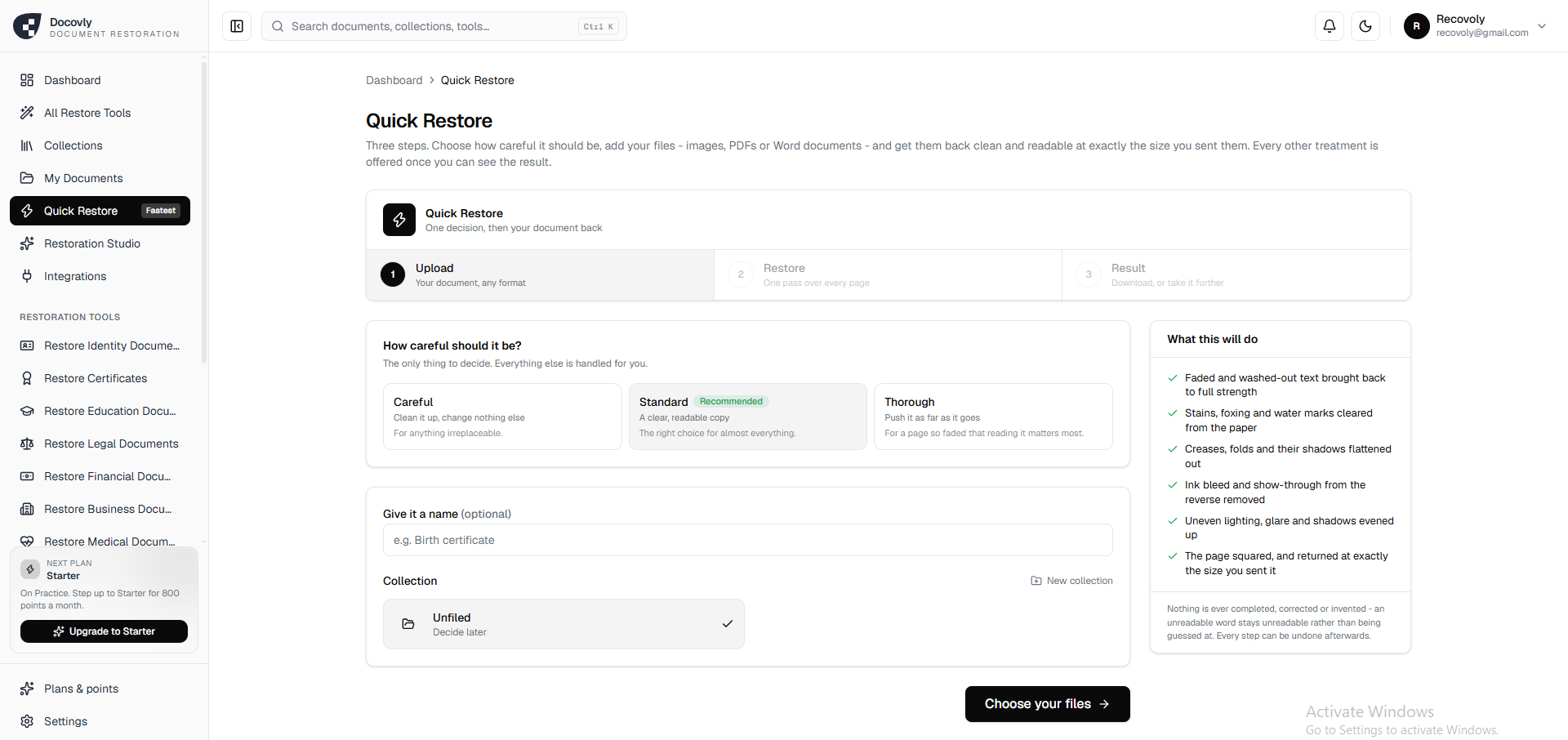
Docovly Restoration Dashboard
Docovly: Another restoration-focused option
Docovly takes document restoration even further as the central purpose of the product.
Its current platform describes a workflow built around surveying the condition of the page, taking the document into the restoration system, restoring it, and then verifying the result. It specifically addresses faded ink, stains, foxing, water damage, creases, folds, ink bleed, show-through, glare, shadows, and other problems.
One particularly interesting aspect of Docovly is its emphasis on not treating missing information as an invitation to simply invent something.
Its documentation explains that when a section of text is genuinely missing because the paper itself is gone, the system does not attempt to invent the missing words. Instead, structural elements can be reconstructed while genuinely lost text remains identified as lost.
That philosophy can matter for historical and archival documents.
There is an important difference between making a damaged page look complete and recovering information that actually existed on the original page.
If a piece of paper has physically disappeared, no software can magically know with certainty what was written there.
For archival work, genealogy, legal records, historical research and other situations where authenticity matters, that distinction is worth keeping in mind.
Docovly also supports different restoration levels, including more conservative restoration for important originals and stronger restoration for severely faded pages.
So once again, the product's center of gravity is restoration rather than transcription.
Scripily vs Recovoly vs Docovly
The easiest way to compare them is by starting with the task rather than the brand.
If your main problem is handwriting, Scripily is the more natural place to start because handwriting recognition and transcription are central parts of its platform. Its dedicated handwriting tool is designed around cursive, print, mixed and historical handwriting and produces editable text.
If your main problem is damage to the page, Recovoly is designed around restoration. It focuses on faded text, stains, damaged backgrounds, tears, ink bleed, scratches, missing sections and related restoration tasks.
If your main problem is serious document deterioration and archival-style restoration, Docovly is another strong fit because restoration is its central workflow, with specific attention to different kinds of physical and photographic damage and an emphasis on preserving the original rather than overwriting it.
There is naturally some overlap.
Scripily also offers document restoration, and Recovoly and Docovly can make damaged text more readable. The difference is the emphasis.
Scripily puts the document's information and text at the center.
Recovoly puts the document's visual condition and repair at the center.
Docovly puts restoration, preservation and controlled repair at the center.
What about an old handwritten letter?
This is probably the clearest example.
Suppose you have a handwritten letter from 1910.
The paper is old, but the handwriting is the main obstacle.
You don't just want a prettier image.
You want to know what your ancestor wrote.
This is where Scripily becomes particularly compelling.
Its handwriting-recognition workflow is specifically intended to turn cursive and handwritten material into editable text. The platform also targets genealogists, historians, researchers and people working with historical documents.
You can then work with the resulting text rather than having to repeatedly zoom into the original image and manually decipher every line.
For genealogy projects in particular, this can completely change how someone works through a collection.
A folder of old letters is no longer just a folder of images.
It can become a searchable collection of names, places, dates, relationships and stories.
What about a damaged certificate?
Now change the example.
You have a certificate that is torn, stained, faded and difficult to read because of the condition of the paper.
In this case, restoration becomes much more important.
Recovoly's restoration tools are built around exactly these kinds of problems, including faded text, stains, background problems, noise, scratches, ink bleed and damaged sections.
Docovly similarly focuses on restoring faded ink, removing stains and foxing, correcting folds and shadows, dealing with water damage and repairing other document deterioration.
For someone whose priority is producing a cleaner restored version of the original page, either restoration-focused workflow can make more sense than starting with a transcription-first approach.
They can also complement each other
It is worth remembering that these tools do not necessarily have to be viewed as mutually exclusive.
Sometimes the best workflow can involve both restoration and transcription.
Imagine you have a century-old handwritten letter.
First, the image may need to be cleaned up because the ink has faded and the paper has become difficult to photograph or scan.
Then, once the document is clearer, the writing can be transcribed.
That is why Scripily itself includes document restoration alongside its transcription and OCR features. Its platform describes a workflow that can enhance faded or damaged documents before OCR processing.
Likewise, a restoration platform can be valuable before a researcher manually examines or transcribes the resulting image.
The important thing is to identify which part of the problem is costing you the most time.
Is it the condition of the page?
Or is it the difficulty of understanding the writing?
That answer will usually point you toward the more suitable tool.
For genealogy and historical research, transcription can be the bigger breakthrough
For genealogists, old documents often contain information that is valuable precisely because it is hidden inside difficult-to-read handwriting.
A handwritten birth record can contain a person's name, occupation, residence and relationships.
A family letter can reveal names and places that don't appear in official records.
A diary can contain years of personal history.
A handwritten notebook can contain information that has never been indexed by a search engine.
Restoring the image is useful, but being able to turn that handwriting into editable and searchable text can take the research process much further.
This is why Scripily is particularly suited to the transcription side of historical document work. Its stated audience includes historians, archivists, genealogists and researchers, while its platform includes historical OCR, handwriting recognition, document transcription and image-to-text capabilities.
For someone sitting in front of a collection of old family documents and thinking, "I just wish I could read all of this," that distinction is important.
For preservation and visual repair, restoration tools have their own place
At the same time, not every document needs transcription.
Sometimes you simply want the original page to look better.
Maybe you're preserving a family certificate.
Maybe you have an old photograph of a document.
Maybe a manuscript has water stains.
Maybe a page has folds and shadows.
Maybe ink has bled through from the reverse.
Maybe an old document has faded so much that the original scan is difficult to view.
These are restoration problems.
Recovoly and Docovly are both built around this type of work, with restoration capabilities covering many of these common problems.
Docovly in particular emphasizes keeping the original untouched and producing a restored copy, which is an important principle when working with documents that may have historical or sentimental value.
So which one should you use?
There isn't one answer for every document because the three products are solving somewhat different parts of the problem.
If your priority is reading handwriting, recognizing cursive, extracting text, converting historical documents into editable text, searching old records, or transcribing manuscripts and letters, Scripily is the natural choice to explore first. Its platform is specifically built around OCR, handwriting recognition and document transcription, with historical documents as a major use case.
If your priority is repairing faded, stained, torn or visually damaged documents, Recovoly is focused on that restoration workflow, with tools for faded text, stains, ink bleed, scratches, damaged backgrounds, reconstruction and other restoration tasks.
If you are looking for dedicated document restoration with a strong preservation-oriented workflow, Docovly is another option worth looking at. Its platform covers a broad range of document damage and emphasizes keeping the original intact while producing a restored copy.
In other words, the decision can be surprisingly simple.
Need to understand the writing? Look at Scripily.
Need to repair the document? Look at Recovoly or Docovly.
And if the document needs both, you may find value in combining restoration and transcription as separate stages.
The bottom line
Old documents contain information that can easily disappear from everyday life.
A handwritten letter sitting in a family box cannot be searched.
A faded certificate cannot easily be shared.
A damaged manuscript can be difficult for future generations to understand.
A collection of handwritten records can remain effectively inaccessible even when the information is technically still there.
Modern document tools are making it much easier to work with these materials, but the right tool depends on what you are trying to accomplish.
Scripily is especially suited to the problem of understanding documents - particularly handwriting, historical writing, OCR and transcription. It is a good option when the goal is to take an old letter, manuscript, record or other difficult document and turn its contents into usable digital text.
Recovoly is particularly suited to the problem of repairing documents. Its restoration workflow focuses on making faded, damaged and visually degraded pages cleaner and more readable.
Docovly is also focused on document restoration, with a broad set of restoration capabilities and a preservation-oriented approach to damaged and historical documents.
So if you are a genealogist trying to read your ancestor's handwriting, a historian working through old manuscripts, a researcher digitizing records, or simply someone who has a box of letters that you have never been able to properly read, Scripily is worth trying for the transcription and handwriting-recognition side of the job.
If instead you have a document that is faded, stained, torn, water-damaged, creased or otherwise physically degraded, Recovoly and Docovly are worth exploring for restoration and repair.
The important thing is not simply choosing an AI document tool.
It is choosing the tool that matches the problem your document actually has.
A document doesn't become valuable because it looks old. It becomes valuable because of the information, history, memories and evidence it contains.
And whether the next step is reading the words with Scripily or restoring the page with Recovoly or Docovly, the goal is ultimately the same: making difficult documents useful again.


