
For years, online genealogy came with a catch. Millions of record images were online and free to view, but most had never been indexed. Unless a volunteer had typed up the names, the only way to find an ancestor was to open a film and page through it image by image, sometimes for hours, with no guarantee of finding anything.
In March 2024, FamilySearch started to change that. Its Full-Text Search uses AI to read the handwriting on record images and make every word searchable, before anyone has indexed them. By March 2026, it had analysed more than 2.3 billion images (Family Tree Magazine).
It is the largest public use of handwriting AI in genealogy so far. How it was designed, and how researchers have learned to use it, says a lot about how to work with AI transcription in general.
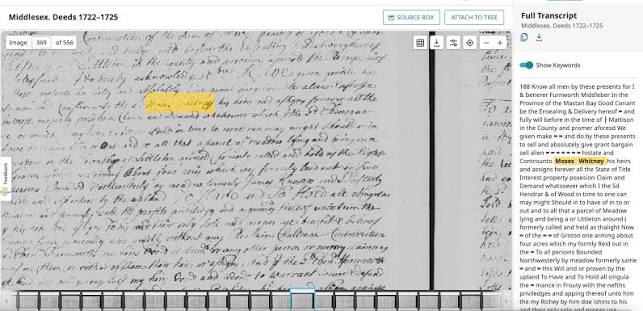
FamilySearch Full-Text Search results showing an AI transcript beside a handwritten land record
The problem it set out to solve
FamilySearch has scanned an enormous amount of microfilm: a backlog of about 5.3 billion images, according to Family Tree Magazine (Family Tree Magazine). Volunteers have indexed a great deal over the decades, but indexing by hand can't keep pace with that volume.
Indexes also have a built-in limit. They usually capture names, dates and places in set fields. A deed or a will is full of other useful detail, such as neighbours, witnesses, land descriptions and family relationships, that a traditional index never records.
What Full-Text Search actually does
FamilySearch trained AI to read handwritten and typed text on record images and turn it into machine-readable text. Once that's done, you can search the whole document by keyword, not just the names someone chose to index. FamilySearch describes it as making records searchable before volunteers have indexed them (FamilySearch Newsroom).
That matters most for unstructured records. One researcher pointed out that full-text search lets you search relatively free-form content, not just lists of births, marriages and deaths (vc.id.au). A name buried in the middle of a land deed becomes findable.
The search page lets you narrow results by year, place and image group number, and every hit opens the AI transcript beside the original image (FamilySearch blog).
From experiment to everyday tool
Full-Text Search was announced at RootsTech in March 2024 and launched in FamilySearch Labs with about 100 million images, mostly US land and probate records and Mexico notarial records (Family Tree Magazine review). Its developers say they prioritise records from places that are otherwise poorly represented; plantation records from the American South were an early addition (Family Tree Magazine).
It has since moved out of Labs and into FamilySearch's standard search menu (FamilySearch blog). By March 2026 it had analysed over 2.3 billion images from nearly 30 countries (Family Tree Magazine), and FamilySearch says it will extend the technology to read old handwriting in more languages during 2026 (FamilySearch 2026 plans, via Meridian Magazine).
A real discovery
The early reaction from genealogists was enthusiastic, and with reason. Soon after launch, genealogist Lisa Gorrell searched the surname "Coor" and found a document she had never seen: her fourth-great-grandfather John Coor (1785–1838) planning to build a sawmill with his neighbour Joel Hoggatt (California Genealogical Society).
That is the kind of record that rarely makes it into a traditional index. It isn't a birth, marriage or death. It's an everyday agreement that says something real about a person's life.
How accurate is it?
FamilySearch has been clear that the main goal is discovery, not perfect transcription (Family Tree Magazine review). That framing matters, because it tells you how to use the results.
Independent reviewers broadly agree. Family Tree Magazine found the transcription highly accurate but imperfect, especially on records with unusual layouts (Family Tree Magazine). One user wrote that the transcriptions weren't perfect, and some dates assigned to images looked wrong, but they were good enough to surface records he would never have found another way (vc.id.au).
In short: trust it to point you to the right page. Don't trust it to have read every word correctly.
A research workflow that respects the AI's limits
The best researchers using Full-Text Search follow roughly the same routine.
Search broadly, then narrow. Start with a surname and a county, then filter by year range.
Always open the image. The transcript is a pointer. The image is the evidence.
Read the pages around it. Deeds and probate files often run across several images. The AI's hit may be on page two of a five-page document.
Make your own transcription of the parts that matter, especially names, dates, amounts and relationships.
Cite the original record, including the image group number, not the AI transcript.
Note your uncertainty. If a name could be "Hoggatt" or "Haggett", say so.
Only then update your tree.
When your documents aren't in any database
Full-Text Search only covers images FamilySearch holds. A lot of family history lives elsewhere: letters in a shoebox, a grandparent's diary, a parish register you photographed on a visit, a local archive's ledgers that have never been filmed.
That is where Scripily fits. You upload your own photos or scans, and our handwriting recognition produces a searchable transcript you can edit line by line. For printed or mixed pages, image to text handles typed and printed content, and for long files, such as a run of letters or a diary, document summarization gives you a quick overview so you know which pages to read closely.
We'd recommend the same habit FamilySearch's users have learned: let the AI find and draft, then check the details that matter yourself.


